
How to test a VAST URL or raw XML with AdMeIn
AdMeIn lets you test both remote VAST URLs and raw VAST XML documents in a single audit workflow.
What AdMeIn supports
Before you run a test, it helps to know what the VAST audit covers.
- VAST versions 2.0 through 4.2
- VPAID and SIMID API frameworks when present in the tag
- Automatic wrapper resolution so you can follow the full redirect chain to the final creative
- MediaFile analysis that audits the physical video asset, not just the XML
- Playback preview, tracking validation, IAB standards checks, structure mapping, and companion ad review
How to run a VAST test
-
Open the AdMeIn VAST Tester Go to AdMeIn VAST Tester and start a new audit.
-
Paste your VAST input Paste either a live VAST URL from an ad server or third-party platform, or paste raw VAST XML directly into the same input field. AdMeIn automatically detects whether the input is a URL or XML and runs the correct parsing flow for you.
-
Submit the audit Click the validation button to start the audit. From there, AdMeIn automatically handles the input type and opens the same full audit workflow whether you started with a URL or raw XML.
-
Review the audit results After the test completes, AdMeIn opens a full VAST audit where you can inspect each part of the response and preview the creative.
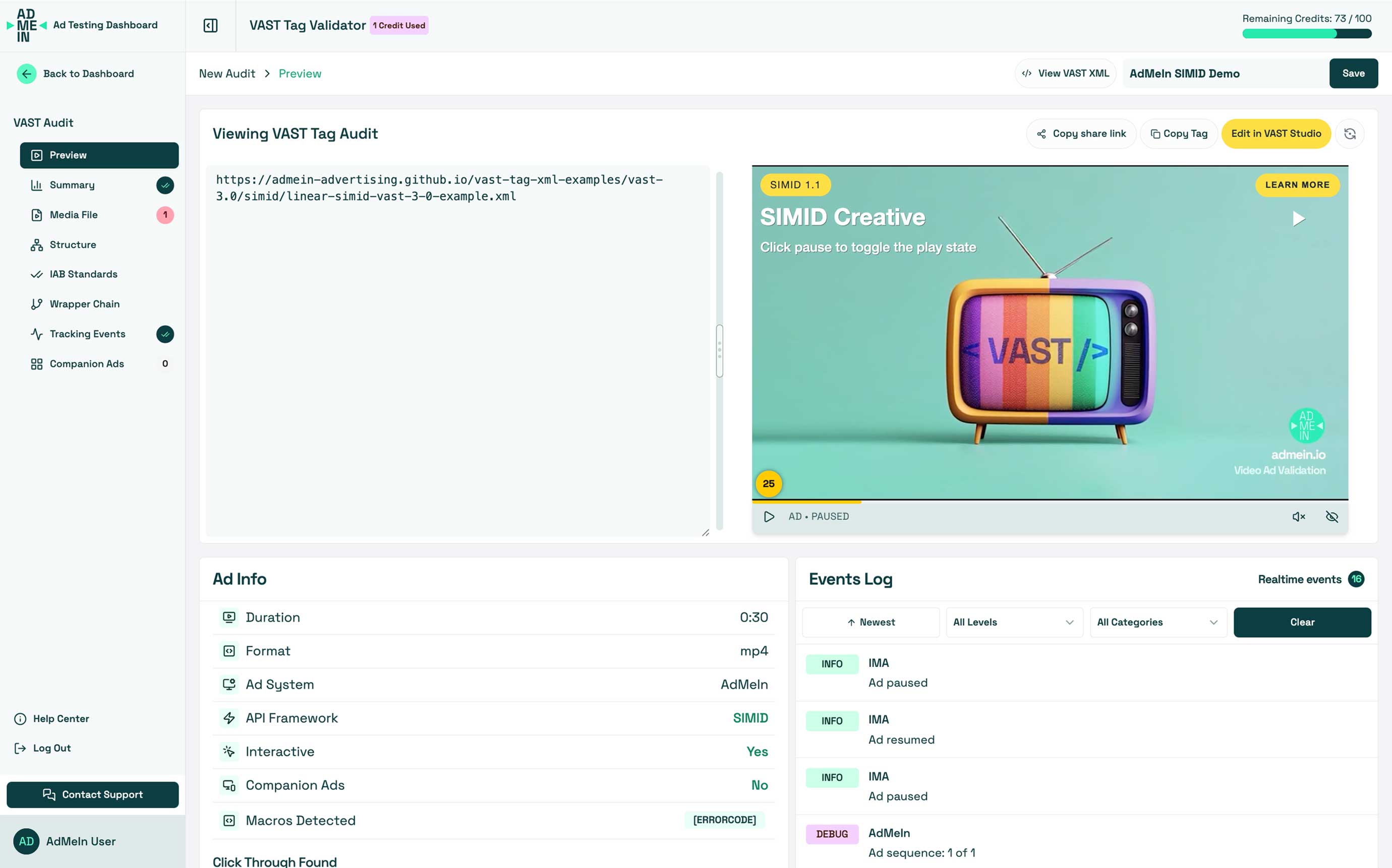
What you can review in the VAST audit
The VAST audit is more than a pass or fail result. It breaks your tag into focused sections so you can troubleshoot quickly.
- Preview: Watch the ad render in a live player and confirm playback behavior.
- Summary: See the high-level validation outcome, detected issues, and overall audit breakdown.
- Media File: Inspect the physical video asset for format, duration, bitrate, and other file-level checks.
- Structure: Visualize how the VAST XML is organized, including creatives, tracking nodes, and media files.
- IAB Standards: Review version-aware checks for VAST 2.0 through 4.2 and spot unsupported nodes or attributes.
- Wrapper Chain: Follow every wrapper hop and confirm redirects resolve correctly.
- Tracking Events: See which tracking events and pixels are present and how they behave during playback.
- Companion Ads: Validate any companion creative included with the video ad.
This is especially useful when you need to confirm whether a problem is coming from the XML itself, a wrapper in the chain, or the final media asset being served.
Exploring the AdMeIn VAST examples
AdMeIn also includes built-in VAST examples covering different tag types, VAST versions, and playback scenarios. They are useful when you want to compare your tag against a working implementation.
Visit The AdMeIn VAST Examples to see a variety of sample tags you can load directly into the tester. Each example includes a description of what it tests and how it is structured, so you can use them as references when building or troubleshooting your own tags.
Example VAST tags
-
- A linear VAST example with icon support.
-
- A SIMID interactive example for testing modern interactive video behavior.
-
- A VPAID interactive example for testing legacy interactive video behavior.
-
- A wrapper example that demonstrates redirect handling through
<VASTAdTagURI>.
- A wrapper example that demonstrates redirect handling through
-
- A VMAP multi-ad example showing how pre-roll, mid-roll, and post-roll ad breaks can be structured.
-
- A VAST example with companion creatives so you can inspect the companion audit results.
-
Google Multi Ad Example + Companion Ads
- A Google IMA example with multiple ads and companion support.
-
- A SIMID interactive example that demonstrates modern interactive support.
-
- A production-style VAST example showing how third-party ad serving can behave in the tester.
-
- A third-party server example using Innovid.
-
- A third-party server example using Adserver Online.
-
- A third-party server example using AdPlayer.Pro.
Extra checks worth making
It is still a good practice to test important tags across more than one environment before launch.
- Confirm the response loads cleanly: Make sure the URL returns valid XML without server or redirect errors.
- Verify wrapper resolution: Check that each wrapper hop resolves to a final playable InLine creative.
- Review the Media File audit: Confirm the actual asset meets your delivery requirements.
- Check playback behavior: Test whether the creative renders and plays correctly in the preview.
- Inspect tracking events: Verify that impression, quartile, click, and error events are present.
- Review version-specific compliance: Make sure your XML matches the declared VAST spec and required features.
Related Resources
- How the video preview works: Learn how AdMeIn renders and audits VAST creatives during playback.
- How to create VAST video ads: Help guide for creating VAST video ads with AdMeIn's VAST Tag XML Generator Suite.
Need more help?
Check out our other help articles or contact support.