
Visual VAST Tag Generator Suite
Our redesigned VAST builder goes far beyond a simple form. The VAST Generator experience combines a searchable catalog, a drag-and-drop canvas, and an instant XML preview so you can architect entire VAST documents without writing raw markup.
AdMeIn's VAST suite references the IAB VAST catalog as its source, so you can be confident that every element, attribute, and version compatibility rule is built into the interface.
Overview of the New Workflow
-
Open the Suite
Launch the VAST Tag Generator to load the shared builder interface. -
You can choose a template from the available options in the top header
Apply one of our many curated templates or begin with the VAST root node only. -
Drag Catalog Elements
The left panel exposes the full IAB VAST schema. Search by name, filter by version, and drag nodes onto the canvas. Allowed parent hints, custom drag previews, and auto-connect cues help you place nodes confidently. -
Connect Existing Nodes
Drop new nodes directly on a parent to auto-create edges. Orphaned nodes already on the canvas can be dragged back over a valid parent—the builder will highlight compatible targets and link them automatically. -
Configure Node Attributes
Click any node to open the detail sheet. Required attributes, optional metadata, media file references, and custom notes are organized per schema definition. Version changes cascade across the entire document. -
Generate and Inspect XML
Use the "Generate VAST" action to compile the graph into canonical XML. A modal preview includes syntax highlighting, copy-to-clipboard, and downstream tester shortcuts.
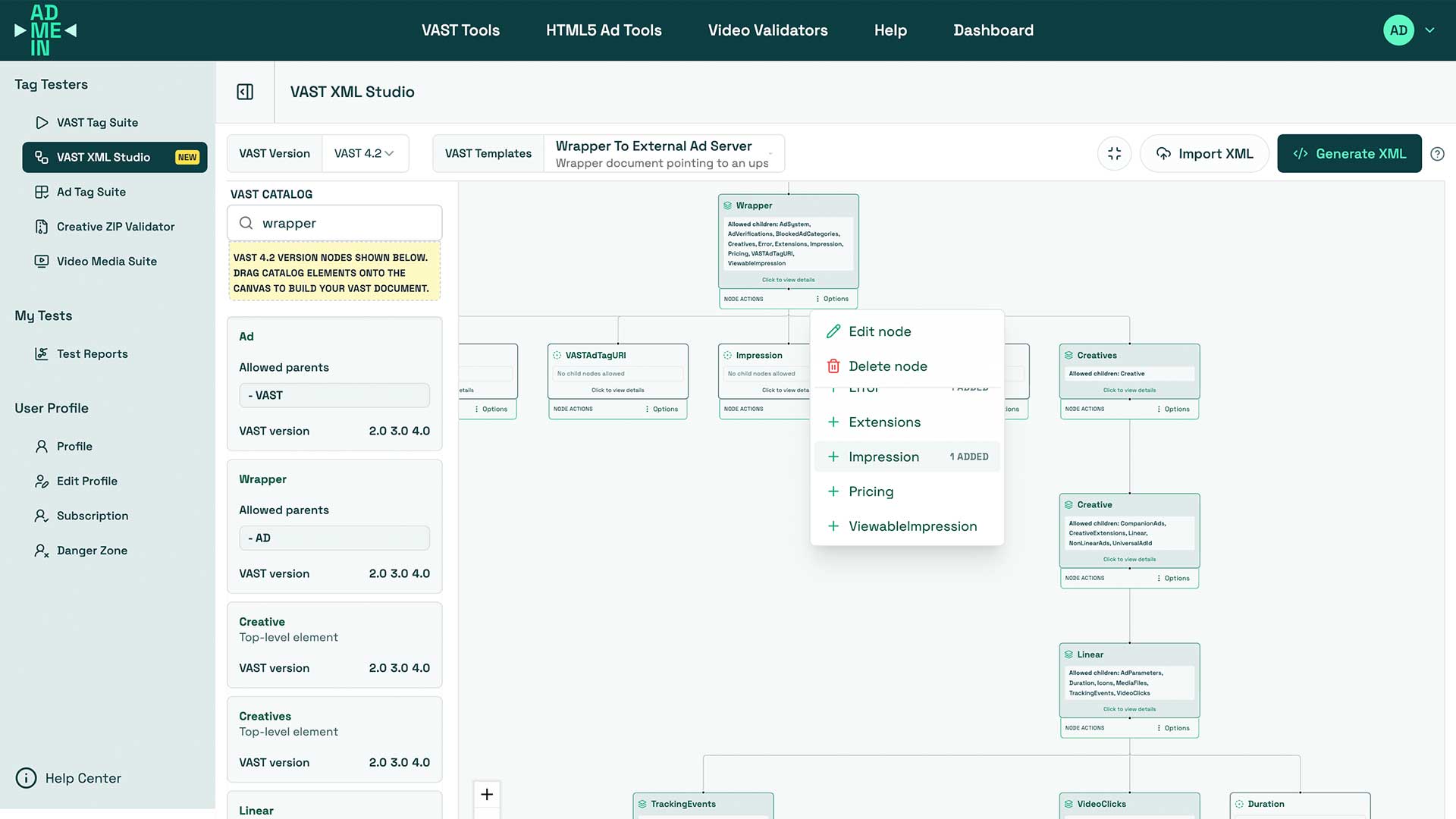
Builder Panels at a Glance
- Header Controls: Rename the document, switch VAST versions (2.0–4.3), swap templates, and launch XML generation. Logged-in users gain save/export options when available.
- Catalog Panel: Searchable index of every VAST element with descriptions, allowed parents, and version support badges. Dragging respects schema rules, and the panel tracks whether you are authenticated.
- Canvas: A workspace with auto layout, parent highlighting, zoom controls, and empty-state coaching. It keeps graph structure readable even as campaigns grow complex.
- Node Sheet: Slide-out inspector for attributes, tracking URLs, linear vs. companion settings, and notes. Validation hints appear before you generate XML.
Import your own XML
AdMeIn's VAST Generator Suite is designed to be flexible for both new tag creation and iterative refinement of existing tags.
If you already have a VAST tag you want to visualize and edit, use the "Import XML" action in the header to parse your existing document into the builder. The graph will populate with nodes and edges reflecting your structure, allowing you to make adjustments without starting from scratch. This is perfect for debugging, optimizing, or documenting tags that are already in use.
Supported Scenarios
- QA & Debugging: Rebuild problematic tags visually, then export clean XML for the VAST Tester or third-party players.
- Education & Documentation: Demonstrate how wrappers, pods, and tracking stacks relate without hand-editing XML.
- Campaign Prototyping: Quickly assemble variations of ad pods, insert companion creatives, and ensure all tracking pixels are wired before trafficking.
- Vendor Certification: Provide partners with standards-compliant tags that reflect your real serving strategy.
Tips for High-Quality Output
Catalog-Driven Structure
- Prefer dragging from the catalog instead of cloning XML snippets. The builder enforces parent/child compatibility and keeps you within the spec.
- Use auto-layout after major edits (or let the canvas trigger it when new edges are added) to maintain a readable graph.
Media and Tracking Hygiene
- Attach multiple media files with distinct MIME types and dimensions for device coverage.
- Populate impression, quartile, click, and error trackers on every creative to avoid silent measurement gaps.
- Add notes or placeholders for server-side macros so downstream teams know where to substitute values.
Validation Workflow
- Assemble and connect nodes until no prompts remain in the sheet.
- Generate XML and review it in the modal.
- Copy into the VAST Tag Tester or your preferred player for runtime validation.
- Iterate in the builder; changes update immediately without starting over.
Watch our YouTube example demo video
Related Resources
- How to test VAST tags: Help guide for validating your VAST tags.
- How to test video ads media assets: Help guide for validating your video ads media assets.
- Tracking Events Guide: Help guide for VAST tracking events.
Need more help?
Check out our other help articles or contact support.